Install and play Project Viewpoint on a multiplayer server
Yes, Project Viewpoint works in multiplayer: each player installs ZombieBuddy, the server lists the mods, and 3D add-ons make furniture, fences and trees 3D.
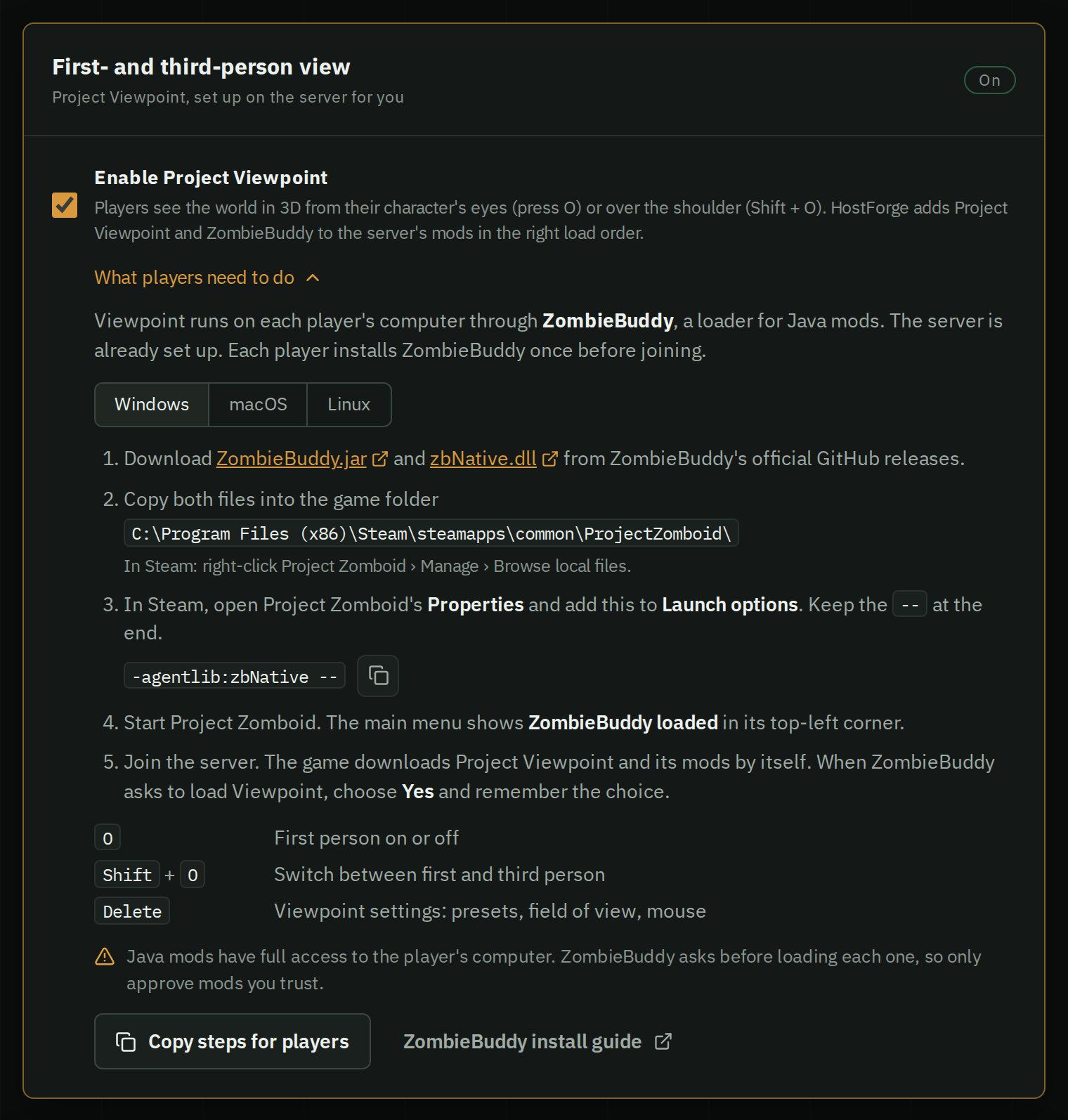
Project Viewpoint draws Project Zomboid in 3D, in first or third person. Yes, it works in multiplayer, on a dedicated server too. It runs on each player's PC through ZombieBuddy, a loader for Java mods, so every player installs ZombieBuddy once. The server only lists the two mods, and each player picks their own view.


Both are community mods, not made by The Indie Stone or HostForge. Viewpoint is in early development.
1. Each player installs ZombieBuddy
Find the game folder in Steam: right-click Project Zomboid, then Manage › Browse local files.
Windows
- Download ZombieBuddy.jar and zbNative.dll and copy both into the game folder:
C:\Program Files (x86)\Steam\steamapps\common\ProjectZomboid\ - In Steam, open Project Zomboid's Properties and set Launch options to this, including the two dashes:
-agentlib:zbNative --
Or use the Windows installer on ZombieBuddy's releases page.
macOS and Linux
- Download ZombieBuddy.jar and copy it into the game folder. On macOS:
On Linux:~/Library/Application Support/Steam/steamapps/common/ProjectZomboid/Project Zomboid.app/Contents/Java/~/.steam/steam/steamapps/common/ProjectZomboid/projectzomboid/ - Set the Steam launch options to this, including the two dashes:
-javaagent:ZombieBuddy.jar --
Start the game: the main menu shows ZombieBuddy loaded in the top-left corner. More in ZombieBuddy's install guide.
2. Add the mods to the server
Stop the server and add both items to its .ini, ZombieBuddy first:
WorkshopItems=3619862853;3809306528
Mods=ZombieBuddy;Viewpoint
Nothing else is needed on the server: Viewpoint's code only runs on the players' PCs. Workshop pages: ZombieBuddy, Project Viewpoint. More in adding Workshop mods.
3. Join and approve
When you join, the game downloads Viewpoint and ZombieBuddy asks to load its Java code. Choose Yes and remember the choice.
Java mods have full access to your PC. Only approve mods you trust. Hold Shift while the game loads to be asked again.
Controls
- O: first person on or off
- Shift + O: switch between first and third person
- Middle mouse button: cursor on or off
- Insert + O: free camera
- Delete: settings (presets, shader packs, mouse, field of view)
3D add-ons
Viewpoint turns the map into 3D, but many objects stay the game's flat sprites: furniture, fences, windows, doors and trees. Community add-ons swap them for 3D models. Like Viewpoint, they only change what players see, so they draw on each player's PC, and the game downloads them when a player joins.


These add-ons work well together. The Combat ones change how guns, throwing and dying zombies work in Viewpoint's views. None adds items, recipes or map changes, so you can remove one later without harming the world. List them after Viewpoint, in this order: the Workshop ID in WorkshopItems= and the mod ID from its Workshop page in Mods=.
3D World
Real 3D furniture, trees, fences and ceiling lamps, shelves that show their loot, and doors that show their damage. Each player downloads about 1.1 GB.
- 6282 3D models for Viewpoint [sour_kisel]:
3810302175 - Project Viewpoint: KK's TREE in 3D (Animated & Seasonal):
3813172420 - Viewpoint 3D Fences and Gates (Beta):
3813723091 - Ceiling Lights (Viewpoint):
3823979843 - Viewpoint - Visible Loot:
3818189653 - Visible Door Damage [B42 MP] - Viewpoint compatible:
3799596085
Combat
Aim down real sights with recoil, bullets that fly, drop and stop at walls, real throwing, and zombies that fall the way they were hit. Each player downloads about 50 MB.
- Project Viewpoint: Recoil & ADS:
3812612054 - Viewpoint True Ballistics:
3812864848 - Viewpoint - Advanced Throwables:
3813194971 - Proper Ragdolls:
3821280085
3D Fences and Ceiling Lights load after the 3D models, and True Ballistics and Advanced Throwables after Recoil & ADS, which needs both.
Troubleshooting
- No "ZombieBuddy loaded": the files are not in the game folder, or the launch option is missing its two dashes. Windows needs both files.
- Viewpoint doesn't start: you answered No. Hold Shift while the game loads.
- Stopped working after a game update: copy the files into the game folder again.
- Can't join after a Viewpoint update: restart the server so it downloads the update.
- Low frame rate: Viewpoint and its add-ons draw on your PC, not the server. Pick a lighter preset in Viewpoint's settings (Delete), or leave out the 3D models.
One checkbox for the server
In the Mods tab, or when you create the server, tick Enable Project Viewpoint. HostForge adds ZombieBuddy and Viewpoint in the right order and shows every player the install steps for their system on the server page. Third person comes with Viewpoint: players switch with Shift + O.
The add-ons above are HostForge's Viewpoint packs: tick 3D World or Combat, and HostForge loads their mods in order and keeps the list current as add-ons come and go. Servers run on fast CPUs with plenty of memory, so Viewpoint and its 3D packs are handled with ease, alongside the rest of your mod list.