Enshrouded server settings, passwords and roles (enshrouded_server.json)
Every Enshrouded server setting: passwords and roles (userGroups), the difficulty presets, and each gameSettings value with its range and default.
The server reads enshrouded_server.json, next to enshrouded_server.exe. Stop the server before editing it. Numbers outside a setting's range are set to the nearest limit; any other mistake, such as a misspelled option, stops the server from starting.
Server basics
name: the name in the server list.slotCount: players, 1 to 16.queryPort: the one UDP port players connect to, 15637 by default.saveDirectoryandlogDirectory: where the world and logs go,./savegameand./logs.userGroups: passwords and what each role may do. See passwords and roles below.
Passwords and roles
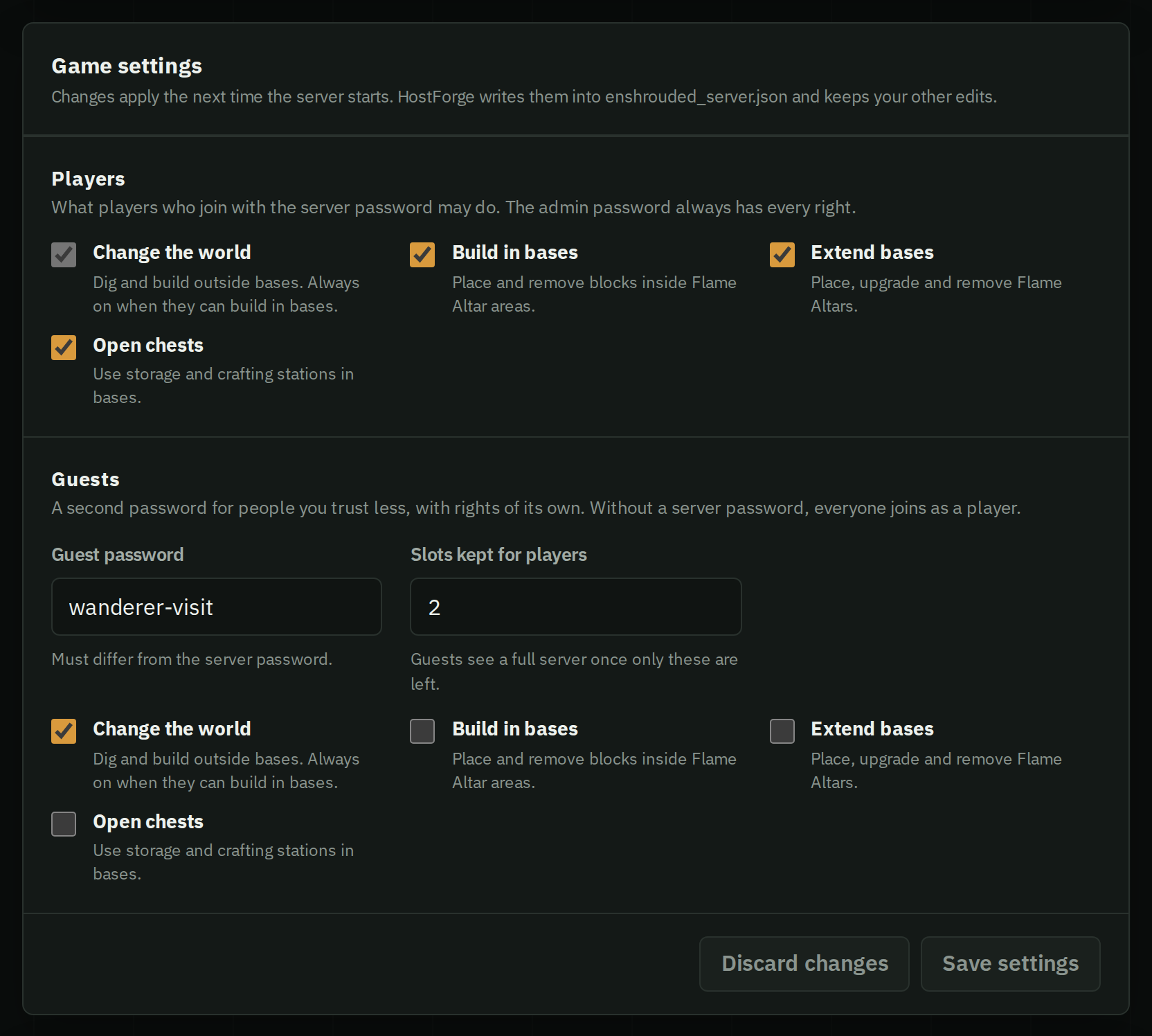
An Enshrouded server has no single password. Each role, or user group, has its own, and the password a player types decides what they may do. Everyone can fight, loot, explore and do quests.
The default roles
- Admin: everything, including kicking and banning players.
- Friend: opens chests, digs and builds, builds in bases. Can't place or upgrade Flame Altars.
- Guest: digs and builds outside bases. Can't open chests or change bases.
- Visitor: can't change the world, bases or chests.
What each permission does
canKickBan: kick and ban players.canAccessInventories: use chests, storage and crafting stations in bases.canEditWorld: dig and build outside bases.canEditBase: place and remove blocks inside Flame Altar areas.canExtendBase: place, upgrade and remove Flame Altars.reservedSlots: slots kept for this role, so others see a full server once only those are left.
Set the passwords
- Stop the server with Ctrl + C and open
enshrouded_server.json. - Under
userGroups, give each role you use its own password, in place of the random one the server created:"userGroups": [ { "name": "Admin", "password": "your-admin-password", "canKickBan": true, "canAccessInventories": true, "canEditWorld": true, "canEditBase": true, "canExtendBase": true, "reservedSlots": 0 }, { "name": "Friend", "password": "your-friends-password", "canKickBan": false, "canAccessInventories": true, "canEditWorld": true, "canEditBase": true, "canExtendBase": false, "reservedSlots": 0 } ] - Delete the roles you don't need.
- Save and start the server. Share each password with the right people.
- Never leave a password empty: anyone with the address could join with that role.
- A role that may build in bases (
canEditBase) needscanEditWorldtoo, or the server won't start. - The old top-level
passwordline is no longer used. If the server finds one, it turns it into a role calleddefaultwith Friend rights. - Join with the admin password to kick and ban from the game. Bans are saved in
enshrouded_server.jsonand last after a restart.
Difficulty and chat
Difficulty preset
- Key
gameSettingsPreset- Values
- Default · Relaxed · Hard · Survival · Custom
- HostForge default
- Default
The difficulty. Relaxed has fewer enemies and more resources, Hard has more and fiercer enemies, Survival adds survival mechanics on top. The settings under gameSettings only apply with Custom.
Text chat
- Key
enableTextChat- Values
- true or false
- HostForge default
- On (true)
Turns text chat on or off.
Voice chat
- Key
enableVoiceChat- Values
- true or false
- HostForge default
- Off (false)
Turns voice chat on or off.
Who hears voice chat
- Key
voiceChatMode- Values
- Proximity · Global (everyone)
- HostForge default
- Proximity
Proximity: players hear the people near them. Global: everyone hears everyone.
Players
The settings from here on are in the gameSettings section and only apply when gameSettingsPreset is Custom.
Player health
- Key
playerHealthFactoringameSettings- Values
- 0.25 to 4, a multiplier (1 is normal)
- HostForge default
- 1
Players' maximum health.
Player mana
- Key
playerManaFactoringameSettings- Values
- 0.25 to 4, a multiplier (1 is normal)
- HostForge default
- 1
Players' maximum mana.
Player stamina
- Key
playerStaminaFactoringameSettings- Values
- 0.25 to 4, a multiplier (1 is normal)
- HostForge default
- 1
Players' maximum stamina.
Body heat
- Key
playerBodyHeatFactoringameSettings- Values
- 0.5 to 2, a multiplier (1 is normal)
- HostForge default
- 1
How long players can stay in very cold areas before hypothermia sets in.
Diving time
- Key
playerDivingTimeFactoringameSettings- Values
- 0.5 to 2, a multiplier (1 is normal)
- HostForge default
- 1
How long players can stay underwater.
Food buff duration
- Key
foodBuffDurationFactoringameSettings- Values
- 0.5 to 2, a multiplier (1 is normal)
- HostForge default
- 1
How long food buffs last.
Time in the Shroud
- Key
shroudTimeFactoringameSettings- Values
- 0.5 to 2, a multiplier (1 is normal)
- HostForge default
- 1
How long players can stay inside the Shroud.
Hungry before starving
- Key
fromHungerToStarvingingameSettings- Values
- 5 to 20 minutes, stored in nanoseconds (minutes × 60,000,000,000)
- HostForge default
- 10 minutes (600,000,000,000)
How long players stay hungry before they start starving, when starvation is on.
Starvation
- Key
enableStarvingDebuffingameSettings- Values
- true or false
- HostForge default
- Off (false)
Hunger and starvation. A starving player loses health until they eat or drink.
Item durability
- Key
enableDurabilityingameSettings- Values
- true or false
- HostForge default
- On (true)
Weapons wear out and break. Off: they never break.
What players drop on death
- Key
tombstoneModeingameSettings- Values
- AddBackpackMaterials (drop backpack materials) · Everything (drop everything) · NoTombstone (keep everything)
- HostForge default
- AddBackpackMaterials (drop backpack materials)
What players lose to a tombstone when they die: their backpack materials, everything, or nothing.
Enemies
Enemy damage
- Key
enemyDamageFactoringameSettings- Values
- 0.25 to 5, a multiplier (1 is normal)
- HostForge default
- 1
Damage from enemies, except bosses.
Enemy health
- Key
enemyHealthFactoringameSettings- Values
- 0.25 to 4, a multiplier (1 is normal)
- HostForge default
- 1
Enemies' health, except bosses.
Enemy stun resistance
- Key
enemyStaminaFactoringameSettings- Values
- 0.5 to 2, a multiplier (1 is normal)
- HostForge default
- 1
How hard enemies are to stun, except bosses.
Enemy perception
- Key
enemyPerceptionRangeFactoringameSettings- Values
- 0.5 to 2, a multiplier (1 is normal)
- HostForge default
- 1
How far enemies see and hear players, except bosses.
Enemy attack frequency
- Key
threatBonusingameSettings- Values
- 0.25 to 4, a multiplier (1 is normal)
- HostForge default
- 1
How often enemies attack, except bosses.
Boss damage
- Key
bossDamageFactoringameSettings- Values
- 0.2 to 5, a multiplier (1 is normal)
- HostForge default
- 1
Damage from bosses.
Boss health
- Key
bossHealthFactoringameSettings- Values
- 0.2 to 5, a multiplier (1 is normal)
- HostForge default
- 1
Bosses' health.
Enemy numbers
- Key
randomSpawnerAmountingameSettings- Values
- Few · Normal · Automatic (automatic (by players nearby)) · Many · Extreme
- HostForge default
- Normal
How many enemies the world has. Automatic, new in 1.0, scales them to the players nearby.
Enemies attacking at once
- Key
aggroPoolAmountingameSettings- Values
- Few · Normal · Many · Extreme
- HostForge default
- Normal
How many enemies may attack at the same time.
Peaceful enemies
- Key
pacifyAllEnemiesingameSettings- Values
- true or false
- HostForge default
- Off (false)
Enemies only fight back once attacked. Bosses still attack.
Shroud curse
- Key
curseModifieringameSettings- Values
- Easy (off) · Normal · Hard (twice as likely)
- HostForge default
- Normal
The Shroud curse some enemies pass on: Easy turns it off, Hard doubles the chance.
World
Mining effectiveness
- Key
miningDamageFactoringameSettings- Values
- 0.5 to 2, a multiplier (1 is normal)
- HostForge default
- 1
Mining damage: more terrain removed and more resources per hit.
Resource yield
- Key
resourceDropStackAmountFactoringameSettings- Values
- 0.25 to 2, a multiplier (1 is normal)
- HostForge default
- 1
Materials per stack from chests, enemies and other loot.
Plant growth speed
- Key
plantGrowthSpeedFactoringameSettings- Values
- 0.25 to 2, a multiplier (1 is normal)
- HostForge default
- 1
How fast plants grow.
Crafting station speed
- Key
factoryProductionSpeedFactoringameSettings- Values
- 0.25 to 2, a multiplier (1 is normal)
- HostForge default
- 1
How fast crafting stations produce.
Weather
- Key
weatherFrequencyingameSettings- Values
- Disabled (none) · Rare · Normal · Often
- HostForge default
- Normal
How often weather events happen.
Glider turbulence
- Key
enableGliderTurbulencesingameSettings- Values
- true or false
- HostForge default
- On (true)
Air turbulence while gliding.
Fishing difficulty
- Key
fishingDifficultyingameSettings- Values
- VeryEasy (very easy) · Easy · Normal · Hard · VeryHard (very hard)
- HostForge default
- Normal
How strong fish are in the fishing minigame.
Startling animals while taming
- Key
tamingStartleRepercussioningameSettings- Values
- KeepProgress (keep progress) · LoseSomeProgress (lose some progress) · LoseAllProgress (lose all progress)
- HostForge default
- LoseSomeProgress (lose some progress)
What happens to taming progress when a player startles the animal.
Flame Altars in the Shroud
- Key
flameLevelFogRemovalingameSettings- Values
- 0 to 20
- HostForge default
- 11
The Flame level from which Flame Altars can be placed inside the Shroud. 0 allows any level.
Day length
- Key
dayTimeDurationingameSettings- Values
- 2 to 60 minutes, stored in nanoseconds (minutes × 60,000,000,000)
- HostForge default
- 30 minutes (1,800,000,000,000)
How long the day lasts.
Night length
- Key
nightTimeDurationingameSettings- Values
- 2 to 60 minutes, stored in nanoseconds (minutes × 60,000,000,000)
- HostForge default
- 12 minutes (720,000,000,000)
How long the night lasts.
Experience and upgrades
Combat experience
- Key
experienceCombatFactoringameSettings- Values
- 0.25 to 2, a multiplier (1 is normal)
- HostForge default
- 1
Experience from combat.
Mining experience
- Key
experienceMiningFactoringameSettings- Values
- 0 to 2, a multiplier (1 is normal)
- HostForge default
- 1
Experience from mining.
Exploration experience
- Key
experienceExplorationQuestsFactoringameSettings- Values
- 0.25 to 2, a multiplier (1 is normal)
- HostForge default
- 1
Experience from exploring and quests.
Weapon upgrade cost
- Key
perkCostFactoringameSettings- Values
- 0.25 to 2, a multiplier (1 is normal)
- HostForge default
- 1
Runes needed to upgrade weapons.
Runes back from salvage
- Key
perkUpgradeRecyclingFactoringameSettings- Values
- 0 to 1, the share returned (0.5 is half)
- HostForge default
- 0.5
The share of Runes you get back when salvaging an upgraded weapon.
Every setting in one form
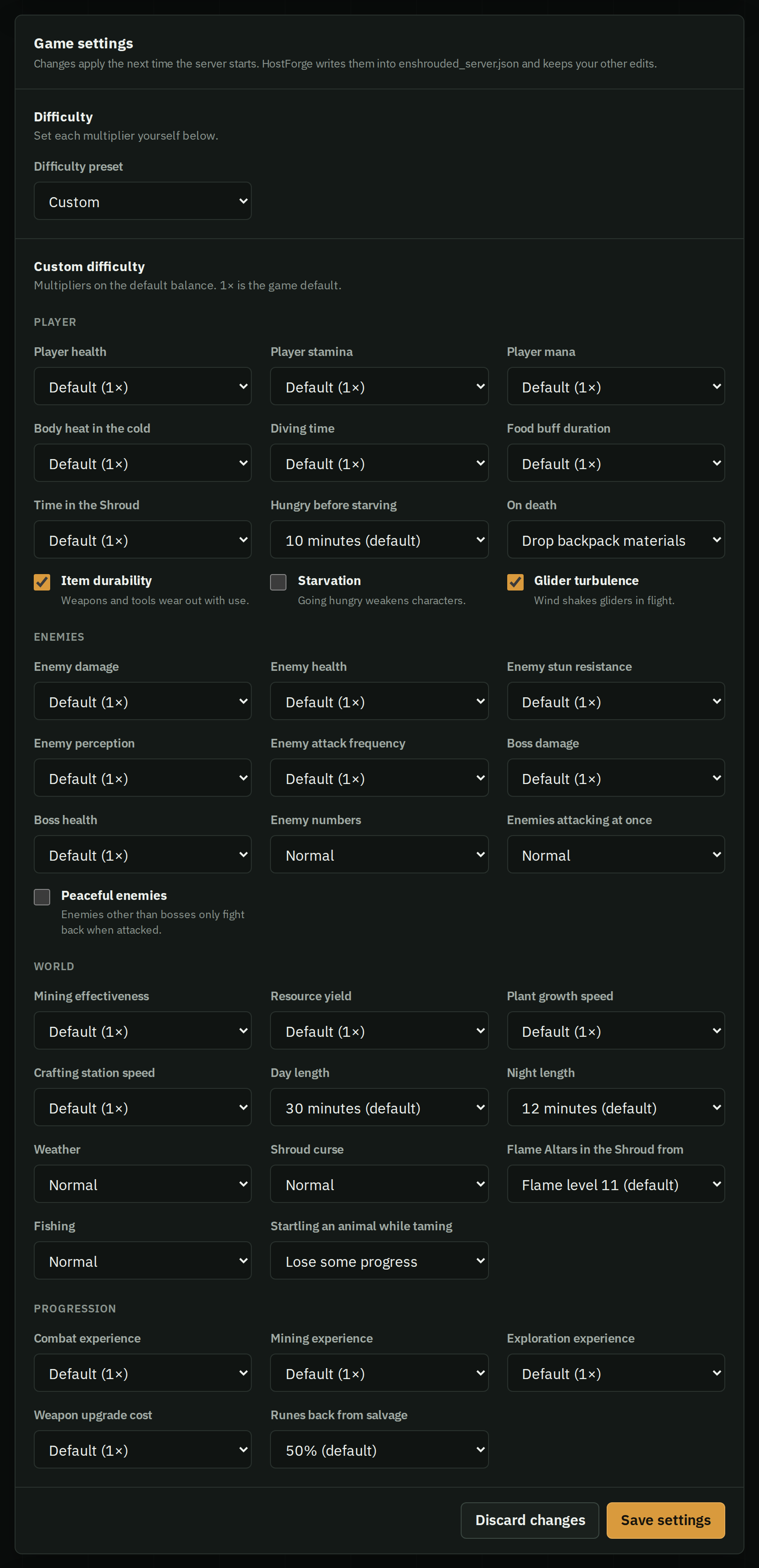
Your server's Settings tab has each of these, with the same names: pick a preset, or Custom to set every multiplier. HostForge checks the ranges and writes your changes into the file at the next start. Anything else can still be edited in the file.
HostForge also sets up the roles. Players join with the server password, you join with the admin password to kick and ban, and an optional guest password gives guests rights of their own. Tick what players and guests may do, and keep slots free for players.